
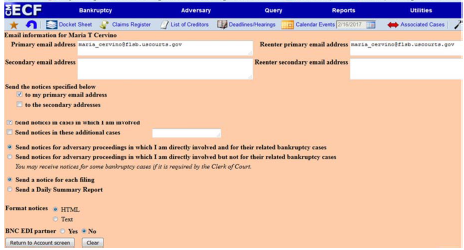
A user's preferences for email notification are specified on the Email Information Screen (see image below) which is accessed via the "Maintain your ECF Account" located under Utilities. In order for a registered user to receive Notices of Electronic Filings for both Primary and Secondary accounts complete the items on the screen as follows: The user has the ability on this screen to enter both a primary and a secondary email addresses by following the instructions.
This screen also allows you to designate to which address(es), which cases, and whether you want to receive a notice for each filing or a daily summary report. The information is saved when you return to account screen and click the Submit button.
For additional information, visit www.flsb.uscourts.gov and select the Resources Menu under the CM/ECF tab >"Managing eMail".
To obtain a list of FAQ's visit www.flsb.uscourts.gov and select FAQ menu under the CM/ECF tab.